Showing posts with label cg. Show all posts

Saturday, November 21, 2009

Free High Res Content for DAZ Studio

I'm back on my graphics kick again, and just spent some time in DAZ 3.0, an unbelievable free piece of software. A couple of weeks ago I picked up a copy of 3DWorld magazine, and the October issue came with a CD with hundreds of dollars of software and resources, including a copy of DAZ 3 and a neat, high res image of a brain courtesy of Flat Pyramid.

The brain comes in a couple of formats, and the .obj was easily imported into DAZ Studio. I was impressed with detail and size of the object. In the image I created below using DAZ's Aiko Character, and I had to reduce its size to 0.03% to get it to fit into her head.
The texture comes in at 2048x2048 jpg file. Nice and slimy looking. A great piece for your 3d scientific imaging needs.

I've got a bit of free time, so I'm off to either play some Warcraft 3, or do some more rendering!

Enjoy!


Tuesday, April 28, 2009

Anime Hottie in Outerspace - Free 3D Models

I created this last night from free stuff from DAZ. The flier in the background is actually quite large, and shown here at 10% its original size. Its called the Stinger and is currently bundled in the Anime Star Fighter set, for FREE!.

The background is actually Cargo Bay Doors by Stonemason, which I think was a freebie at one point but I wasn't able to find it in the DAZ3D catalog.
The figure is Aiko3 Base, with skin and XinXin shape and morph as well as the Sailor outift and hair from Made In Japan, which also comes with the free Anime Uniforms bundle. The Made In Japan bundle alone costs $49.95 so this is a totally amazing set.

Keep your eyes open, because there is always lots of free material available from DAZ but also lots of excellent models, props, outfits and other great resources. Join the ArtZone and look for me as Tigerrune. I also have some images of a slightly more scantily clad XinXin available on Flickr.

Leave a comment if you're interested!

Friday, March 27, 2009

Great new items at Daz 3D

I just found another great surprise in my inbox. How could you possibly turn down an item like this?

That is a hot uniform package outfit available for Victoria 4. I think the tattoo looks great!

Also available right now is a free set of seats inspired by the Kingdom of Marrakesh. AND if that wasn't enough, you can also get a free set of lights with 1002 Nights - Party Light Set which includes:

135 DAZ|Studio Lights in total

  • 2 Door lights
  • Main light
  • 8 Window lights
  • 28 Arch lights
  • 24 Ambient lights
  • 16 Ceiling lights
  • 56 Pillar lights
Makes me wish I had more time to work in Daz|Studio these days. Once work slows down, maybe in May I can put up some new images of my own.

Enjoy!

Monday, February 9, 2009

3D opportunities in SecondLife

I've been spending a lot of time in SecondLife (SL) lately, and if you are interested in 3D graphics at all then it is something you should definitely look into. People are making money in SecondLife, and content providers who can create 3D objects and textures are just the people who are set to make the most money.

SecondLife residents (called avatars) need two things just like we do in the real world (or our FirstLife, or RL... Real Life).
  • Shelter
  • Clothing
Luckily, they don't *need* food, but you can definitely make some coin if you sell 3D representations of food, drinks... anything that looks good and people would want. I'll focus on clothing here, then discuss shelter in the future. Mainly because people is SecondLife always want new clothes, but they rarely need more than one place to live.

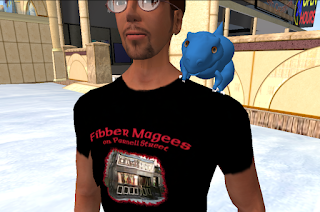
There are plenty of places where people can get clothing for free. These free clothing items are usually in the form of simple textures that appear over the avatar's body. Oh yes, and if you can create photo-realistic skin like those available for DAZ|Studio or Poser then you can definitely make some good money! To the left, you can see an image of an avatar wearing a texture shirt. Not complicated, and Robin Wood has a great template for creating free t-shirts at her site.

Of course if you're selling shirts, don't use her template... you mooch.

The clothing that comes available as textures doesn't have the flexibility that clothing made out of primitive shapes, or "prims" do. Prim clothing is where the real money exists in SecondLife.
On the right, you'll see a cute little outfit made of prims. Prim shoes, prim ears, a flexi prim dress and tail set the outfit off great.

The major problem with creating objects in SecondLife deals with the horrid user interface of creating objects "in-world"... that is, while you are connected to SecondLife through the SL viewer.

To combat this problem, LindenLabs (the creators of SecondLife) recently made changes to the viewer that allow objects / clothing to be uploaded as a texture called a "sculpty". A sculpty is a 2D "texture" (a collection of coloured dots as RGB triples) that get converted into a 3D object (a collection of x,y,z coordinates)! There are a number of packages out there that allow you to create sculpties so you can upload them to SecondLife. BTW: Uploading textures, objects and even animations (yes, so dust off those .bvh files you created) cost $10L or $10 Linden dollars... the in-world currency that you can buy yourself with real money or find ways to make it in-world. So if you are testing a lot, make sure you have some money and you're stuff is good enough that you'll be able to make it back when you sell it.

Some software:
  • Wings3D has a plug-in to create sculpties (see the tutorial on the SecondLife Wiki)
  • Blender is an interesting Open Source 3D program I'm just learning more about. There is a tutorial at SecondLifeArtist but frankly, once I figure out how to use Blender I can write a better tutorial myself
  • Even DAZ|Studio has a new setting that allows you to export poses as .bvh files into a format recognized by SL, so your new outfits will look best with your custom poses. I've tried it. It doesn't work... yet. But perhaps I'll check the manual and try again.
So there you have it. A quick overview of SecondLife, ideas on how to make money (both real and virtual) as well as software (that you might already know) to help you with getting your feet wet in SecondLife.

Oh yes, and check the background for the first image I posted. Someone had to model the building, the glasses, the dino (actually, I think someone at DAZ did that... they have an Island in SL you know) and then had to texture it all as well.

So post a comment and let me know what you do in SecondLife with your graphics skillz!

Wednesday, January 7, 2009

Movies in Second Life

This looks like a great film, and I was so impressed with the Windlight file that I used it myself for some great pictures in Second Life.

This one is a steampunk machinima created in Second Life.

http://nwn.blogs.com/nwn/2008/12/joy-of-mescalin.html

Wednesday, May 7, 2008

Review: Google SketchUp

Google’s SketchUp is a great program to get you started with creating your own 3d virtual objects, buildings and worlds.


For months I had wanted to check out Google’s SketchUp application but never got around to it. I’ve been in love with 3d graphics for years but never spend enough time on it for my liking. With things at work getting a bit quieter for the summer, I found time to download and install the SketchUp Viewer and the free tool itself, but just had time to work on it today.

I was amazed! Even though the program runs a bit slow on my computer (due to either the problems I’ve had with Windows recently or the fact that I have a crappy video card) I was very impressed with what can be accomplished with only learning 2 design tools and 3 navigation tools!

When you start up SketchUp, you are provided with the “tips” screen, which they call the Learning Center. The first tip has a link to a model, so you should click on that link and it opens a “model” that has been designed as a multi-tabbed tutorial. Each tab of the tutorial has some information on how to use a given tool and you can actually use each tool from within the tutorial. In 15 tabs it shows you how to create a relatively complex object or building with only 2 creation tools.
The 3 navigation tools it introduces are the Orbit, Pan, and Zoom tools:

And the 2 design/create/edit tools are Square and Pull-Up:

The “pull-up” style of building a box from a flat plane is nothing new, as it is a common tool used in 3D graphics modeling packages such as Maya and Wings3D and others, but I’ve never quite had it explained so clearly and concisely before.

Google SketchUp offers a clean interface, helpful tutorials (which I will definitely check out) and an interesting Model Warehouse feature which will keep you busy for well…months! I’ll definitely be trying out some more of the program to see what can be created. At the end of the tutorial, I was able to create quite a complicated object considering it started with only 1 square shape. Click on the image to view a slightly bigger version:


Write a comment and let me know what you think about Google SketchUp and what other tutorials you’d want to see on the program, or any other tutorials you’d like to see. I’ll do what I can!