Tuesday, September 30, 2008

3D Camera news

Wired Article regarding FujiFilm's Real 3D Camera:
http://blog.wired.com/gadgets/2008/09/fujifilms-two-l.html

Really expensive ways to glue two cameras together:
http://www.stereoscopy.com/3d-concepts/cameradig.html

Monday, September 8, 2008

Philippe Fuchs runs from Paris to Beijing

Wow, more 3D VR stuff in the blogosphere!

I just found this article about the Virtual Plus Reality Challenge while checking out Kate's blog at 3DSports.

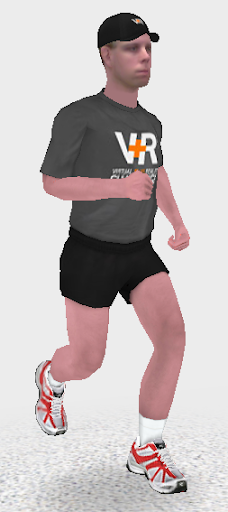
Apparently they had runner Philippe Fuchs run 8,500 km while
From the official website:
Renowned French Marathon Runner Philippe Fuchs Arrives in Beijing after Running for 161 Days and 8,500 Kilometers Read the news.

A video on the site explains in detail. Quite simply, Fuchs is also a professor and virtual reality researcher. The purpose of the run was to record data on the mechanics of the foot to help build a better virtual model.

A great way to use VR, and a great look at where VR has come in the world.

The great part about it was you could follow Fuchs on Facebook and take part as a virtual runner. Wish I had heard about this earlier! Congratulations to Philippe Fuchs and his run to Beijing! Not to mention his work in virtual reality.

This image was created from the Facebook application. Do a search for vplusr and you should be able to find it.

The software will allow you to upload a front and profile picture of yourself, or take fresh pictures with a webcam that you have connected. I'm very impressed with what it was able to stitch together given the quality of my webcam, and the distractions in the background behind me.

The application is fun in itself as well.

3D Stereoscopic Movie with James Cameron: Avatar

The new school year is keeping my busy, but here is a quick set of interesting links re: 3D movies and video eyewear.

Here's a great little article about an upcoming 3D movie by James
Cameron. I'll try and find some other information about it and post it
when I can but until then, enjoy this article about James Cameron's 3D film Avatar.

And if you are interested in wearable computing, check out what I hope will be my next purchase: a refurbished MyVu Solo Plus.

Update: Dino sends in this link on a different brands of video eyewear. Better variety, higher prices but interesting. Also allows you to buy bulk at wholesale!

These items would be great for a garage virtual reality system.

Now I'm going to try and draw a Red-Green stereoscopic cube on my whiteboard :)

Friday, August 22, 2008

3D collection of proteins and other molecules

A friend just directed me to this link discussing the usefulness of Proteopedia, a Wiki that collects interactive, 3D models of molecules, proteins.


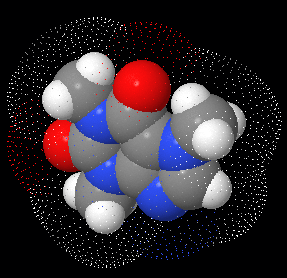
This picture, by the way, is taken from the JMOL site, which is the interactive, 3D molecular visualizer used on Proteopedia... and OpenSource! Ooo... I'm getting ideas... yay!


We got on this discussion because we were discussing the creation of our own 3D viewing system (possibly using shutter glasses, that sort of thing).

Hmm, I'll have to get a picture of me in my VR helmet and post it on here. Garage VR was a favourite topic of mine back in the 90's and maybe I can dust of some old ideas and post them here. What was old is new again as they say!

Friday, June 20, 2008

Create 3d graphics with DAZ3D

I just got back from vacation so hopefully some of the wonders of Ireland will rub off on me and I can begin creating some Celtic-inspired work. The Book of Kells has been a big thing for me and I am about to check it out on CD-ROM so I can't wait to get started!

But what is REALLY great is that DAZ3D and the ArtZone Community have just made it even easier to work with 3D graphics. DAZStudio is a great product, and by joining the ArtZone community you'll get to read about amazing artists and get great tips and free 3d models. Sign up for the DAZ emails because every now and then some of items that are on sale are given away for free. And we're not going to complain about free models and textures are we?

When you get to the download page at http://www.daz3d.com/i.x/software/studio/-/download?&_m=d&refid=391015437 , scroll halfway down to the Download.com links. The two bundle advertised at the top of the page are not required, you can find free models very quickly. Besides, DAZStudio comes bundled with a lot of free models to start with!

I'll get around to posting some of the images I've created with DAZ over the years and post them here. I'm by no means an expert, but I can help you get started in working with this great program.


Wednesday, May 7, 2008

Review: Google SketchUp

Google’s SketchUp is a great program to get you started with creating your own 3d virtual objects, buildings and worlds.


For months I had wanted to check out Google’s SketchUp application but never got around to it. I’ve been in love with 3d graphics for years but never spend enough time on it for my liking. With things at work getting a bit quieter for the summer, I found time to download and install the SketchUp Viewer and the free tool itself, but just had time to work on it today.

I was amazed! Even though the program runs a bit slow on my computer (due to either the problems I’ve had with Windows recently or the fact that I have a crappy video card) I was very impressed with what can be accomplished with only learning 2 design tools and 3 navigation tools!

When you start up SketchUp, you are provided with the “tips” screen, which they call the Learning Center. The first tip has a link to a model, so you should click on that link and it opens a “model” that has been designed as a multi-tabbed tutorial. Each tab of the tutorial has some information on how to use a given tool and you can actually use each tool from within the tutorial. In 15 tabs it shows you how to create a relatively complex object or building with only 2 creation tools.
The 3 navigation tools it introduces are the Orbit, Pan, and Zoom tools:

And the 2 design/create/edit tools are Square and Pull-Up:

The “pull-up” style of building a box from a flat plane is nothing new, as it is a common tool used in 3D graphics modeling packages such as Maya and Wings3D and others, but I’ve never quite had it explained so clearly and concisely before.

Google SketchUp offers a clean interface, helpful tutorials (which I will definitely check out) and an interesting Model Warehouse feature which will keep you busy for well…months! I’ll definitely be trying out some more of the program to see what can be created. At the end of the tutorial, I was able to create quite a complicated object considering it started with only 1 square shape. Click on the image to view a slightly bigger version:


Write a comment and let me know what you think about Google SketchUp and what other tutorials you’d want to see on the program, or any other tutorials you’d like to see. I’ll do what I can!